
How to Create One Aukciony Order for Multiple Items from the Same Seller
When you plan to buy several products from one marketplace and want everything processed together, the most convenient solution is to create a multiple items order through En.Aukciony.com. A multiple items order allows you to combine several purchases into one request, receive one invoice. And manage the entire process through a single order in your account. This is especially useful when the original marketplace does not support international checkout or foreign payment methods. But you still want all items purchased and shipped in a coordinated way.
When a Multiple Items Order Can Be Used
A multiple items order works when all products come from the same seller. Large marketplaces make this process simple because items can be purchased within one platform and shipped domestically to a single destination.
However, this format cannot be used for classified platforms where millions of independent sellers operate separately. For example, it is not possible to combine items from different sellers on Avito into one order because each seller processes shipping independently and requires a separate transaction. In such cases, each seller must have an individual order.
Where to Create a Multiple Items Order
To create a multiple items order, open the official order form on the Aukciony website.
This is the only form you need, even if you are buying many products.
What Link to Add in the Order Form
When filling in the form, start by placing a general link to the website where all items are listed. You do not need to insert every product link into the main link field. A single marketplace link is enough because the full product information will be provided in the comment section.
How to List Multiple Products Correctly
The comment section is the most important part of a multiple items order. This is where you clearly describe everything you want to purchase.
Add direct links to each product and include all essential details such as quantity, size, color, model, version, and any other characteristics that affect the purchase. The clearer your comment is, the faster and more accurately your order can be processed.
Make sure to include all product links in the order comments, set the total quantity as 1, and enter the total price for all items.
After receiving your request, the Aukciony team opens each link you provided, checks the specifications, and purchases the items on your behalf.
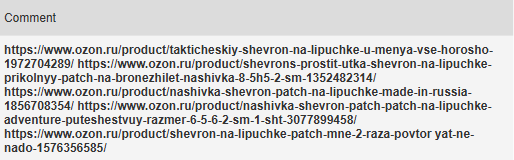
Here is an example of how product links may appear inside one multiple items order comment:
Why Product Specifications Are Important
Providing complete product specifications is essential for a successful multiple items order. When several variations exist, you should always clarify the exact parameters of each product so the purchasing team can avoid mistakes and delays.
Accurate quantities, correct sizes, chosen colors, model names, and version details ensure the order is processed without additional clarification.
What to Do with the Delivery Section
You may notice a delivery section in the form, but when creating a multiple items order, this field can be left blank.
Delivery is calculated by the manager after reviewing the order. The calculation includes shipping costs and physical parcel collection. Parcels are collected directly from verified pickup locations to ensure safe handling.
After reviewing logistics, the manager updates your order and leaves a comment with the corrected delivery information.
When You Can Pay for the Order
Once submitted, your multiple items order enters the review stage. During this time, the team verifies links, checks product availability, and calculates domestic shipping. Prices and delivery details may be adjusted while the order is being processed.
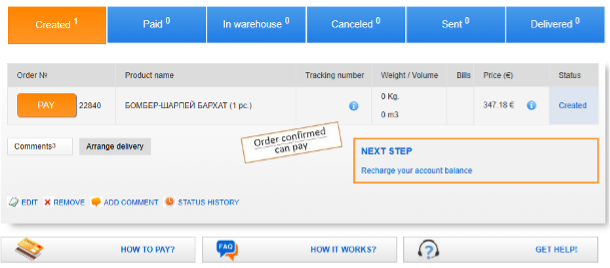
Payment should only be made after confirmation. You will know the order is ready when its status changes to “Order confirmed — can pay.” This confirmation means all details are verified and the purchase can proceed safely.
Example of Confirmed Order Status
Below is an example of how a confirmed order appears in your account. When you see the confirmation stamp, your multiple items order is approved for payment.
If the Form Looks Like It Supports Only One Product
Some customers assume the order form supports only one product because it contains a single link field. In reality, the same form fully supports a multiple items order.
The correct method is to provide the general marketplace link at the top. And include all product links and specifications in the comment section. This is the standard ordering process used by Aukciony clients. The purchasing team relies on your comment to navigate to each product page and complete the purchases accurately.
Multiple Items Orders Made Convenient
A multiple items order is the simplest way to combine several products into one structured request, avoid duplicate forms, and manage everything through one order page. As long as all items come from the same seller, the process remains fast and organized.
With En.Aukciony.com, international customers can shop from Russian marketplaces conveniently, receive consolidated support, and rely on accurate purchasing and dependable global shipping even when the original store does not work with foreign buyers.
FAQ: How to Create One Order for Multiple Items from the Same Seller with Aukciony
How do I place an order?
Use the official order form on Aukciony’s website: Order Form. You simply paste the links to your chosen parts, confirm the total price. And submit your request.
How much does packaging cost?
Packaging varies from 9 to 24 euros, depending on size and fragility. For example, a dress costs about 9 euros. A porcelain figurine (fragile, requires strong protection) may be 20–30 euros.
How much does shipping cost?
Shipping costs depend on the weight and destination country. Export registration is 15 euros. Delivery rates depend on the destination country.
How long does delivery take?
Delivery times vary by country. To Europe — 2 to 5 weeks, to Georgia — 1 to 2 weeks. !!! Shipping to the US is available only as a gift. And for items in the parcel <100$ .
Can I order several items from one seller?
Yes, you can. Create one order, indicate the total amount for all items. Then list the links and characteristics of all items in the comment field. And set the quantity to one. After confirmation, you can pay.
Are there restrictions on what can be shipped?
Some items are not accepted for purchase. Always check with your manager before ordering.
Can I buy directly using a Russian address?
If you have a Russian phone number and a local bank card, yes! Use Aukciony’s Russian address. If you don’t, simply place your order through Aukciony’s buying form. International transfers to Russia don’t work, but Aukciony can handle everything on your behalf.
Nice shopping!

Fill in the Form of the Order | Get an Address For Shopping | Pick Up and Deliver a Parcel | Reviews |
Shipment Calculator | Where To Buy?


